
Employees
Your home dashboard
Your Home screen shows what you've earned this week and every live contest at your store.
Last updated 2026-09-25
Home is the first thing you see when you open Kief. It's built around two things: what you've earned, and what's live right now.
What's on the screen
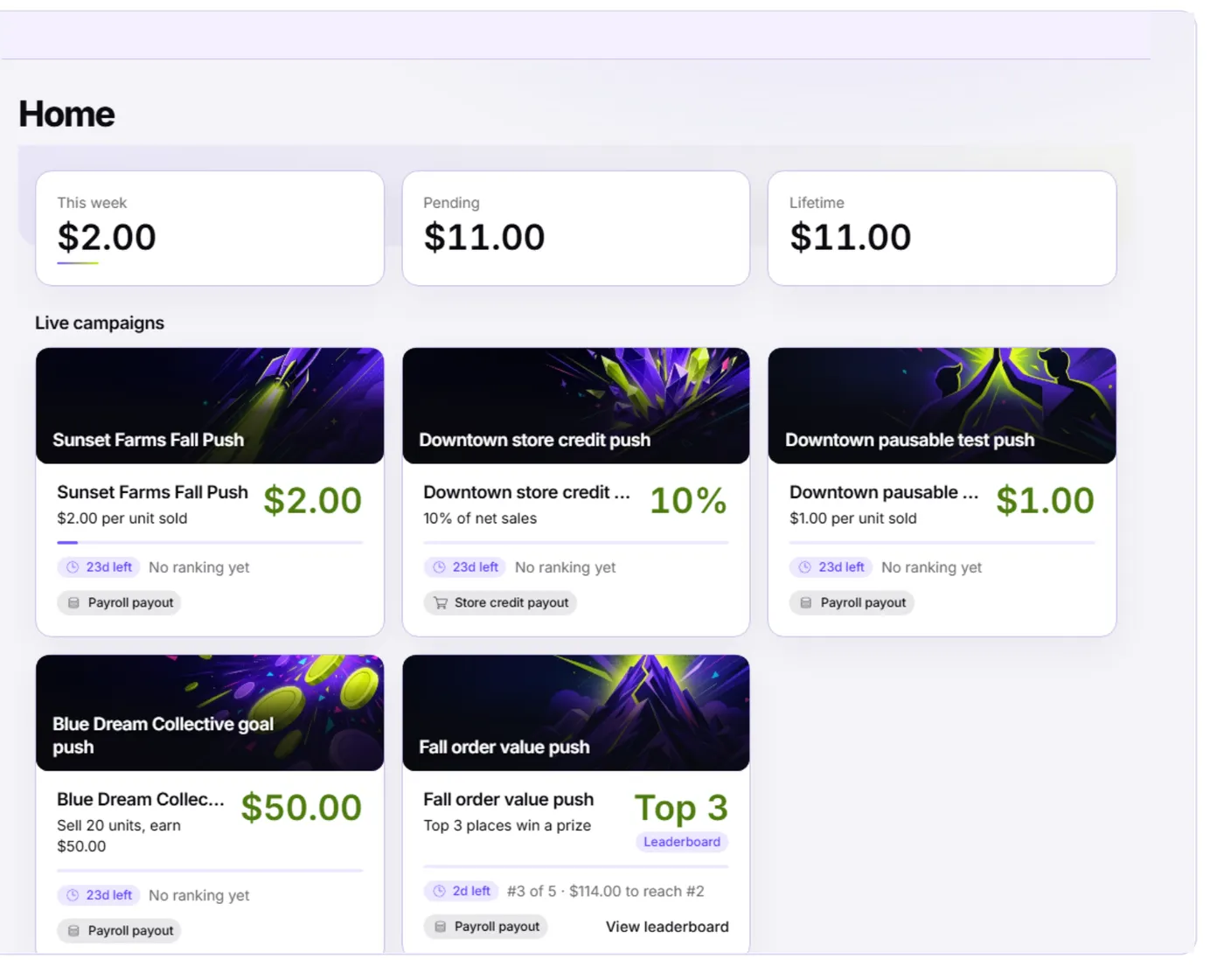
- This week, Pending, Lifetime — three quick totals. "This week" is what you've earned since the week started, "Pending" is earnings recorded but not yet paid out, and "Lifetime" is everything you've ever earned in Kief.
- Live campaigns — a card for every contest currently running at your store. If nothing is live right now, you'll see an empty state instead — that's normal between contests.
Reading a campaign card
Each card shows the contest name, its rule in plain words (like "$2.00 per unit sold"), a progress bar, how many days are left, and how it pays out. A contest set up as a leaderboard also shows your current rank and how far you are from the next prize place. Selecting a card opens the full contest detail, or the leaderboard directly for a ranked contest.
Tip: Your avatar shows next to the Home title once you've picked one in Settings. See your avatar.
Getting around
The top navigation moves between Home, Earnings, and Settings. Home is where you'll land every time you open Kief, so it's the fastest way to see what's active and what you've earned recently.